




Hello developers, Today I am going to show you how to create custom widget in ACF wordpress.
Please follow below steps:
Step-1: Create a new file and name it acf-custom-widget.php. Put it into your theme’s plugins>advanced-custom-fields directory.
Step-2: Put below code in your functions.php file.
require( ABSPATH .'/wp-content/plugins/advanced-custom-fields/acf-custom-widget.php' );
Step-3: Put below code in your acf-custom-widget.php file.
<?php
/*
  A custom ACF widget.
*/
class ACF_Custom_Widget extends WP_Widget {
    function __construct() {
        parent::__construct(
            'acf_custom_widget', // Base ID
            __('ACF Custom Widget', 'text_domain'), // Name
            array( 'description' => __( 'A custom ACF widget', 'text_domain' ), 'classname' => 'acf-custom-widget' ) // Args
        );
    }

    public function widget( $args, $instance ) {
        echo $args['before_widget'];
        if ( !empty($instance['title']) ) {
            echo $args['before_title'] . apply_filters( 'widget_title', $instance['title'] ). $args['after_title'];
        }
        echo get_field('title', 'widget_' . $args['widget_id']);
        // Place your ACF code here
		echo $args['after_widget'];
    }

    public function form( $instance ) {
        if ( isset($instance['title']) ) {
            $title = $instance['title'];
        }
    ?>
    <p>
      <label for="<?php echo $this->get_field_id( 'title' ); ?>"><?php _e( 'Title' ); ?></label>
      <input class="widefat" id="<?php echo $this->get_field_id( 'title' ); ?>" name="<?php echo $this->get_field_name( 'title' ); ?>" type="text" value="<?php echo esc_attr( $title ); ?>">
    </p>
    <?php
    }

    public function update( $new_instance, $old_instance ) {
        $instance = array();
        $instance['title'] = ( ! empty( $new_instance['title'] ) ) ? strip_tags( $new_instance['title'] ) : '';
        return $instance;
    }
}
add_action( 'widgets_init', function(){
  register_widget( 'ACF_Custom_Widget' );
});
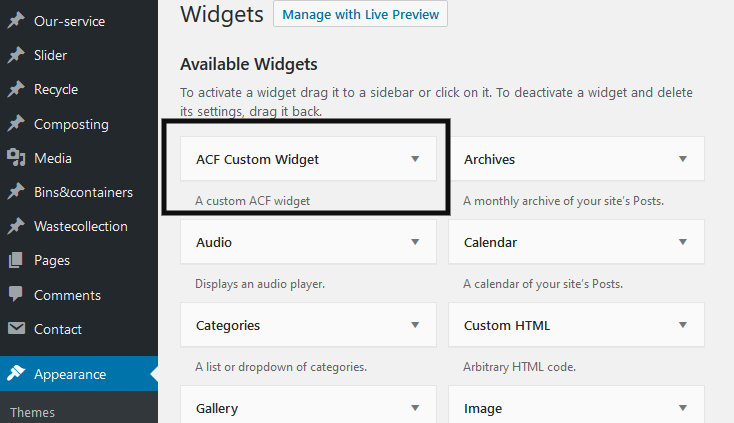
When you create new field group, you can select ACF custom widget. You can see in below screenshot.
I hope this article is useful for you.
Thank you. 🙂
